E-Way Bill Rules and Generation Process 2026: Complete Guide for GST Compliance
E-Way Bill Rules and Generation Process 2026
Your complete roadmap to GST e-way bill compliance and hassle-free movement of goods
What Is an E-Way Bill and Why Does It Matter?
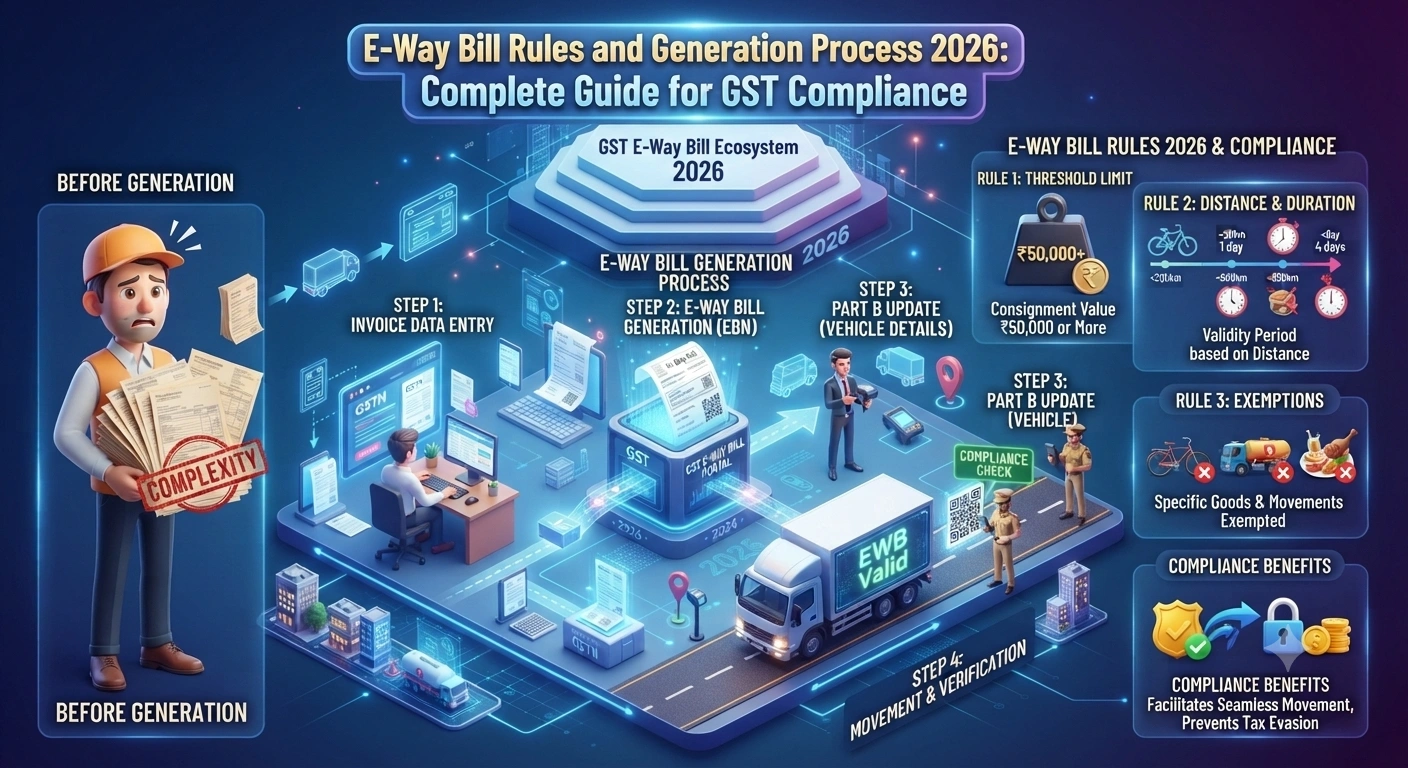
An e-way bill is your digital pass for moving goods across India. Think of it as a virtual travel document for your products. The thing is, if you're shipping goods worth more than 50,000 rupees in a single consignment, you need an e-way bill. No exceptions.
The government introduced this system to track goods movement, prevent tax evasion, and make supply chains more transparent. And honestly, it's made life easier for most businesses once you understand the process. So what does this mean for you? You need to know the rules inside out.
The e-way bill system went live in April 2018, but the rules keep evolving. By 2026, the process is smoother, faster, and more integrated with GST systems. You can generate bills in minutes now instead of hours.
Who Needs to Generate an E-Way Bill?
Not everyone needs an e-way bill. Let me break down who's required to generate one and who isn't.
- Registered GST suppliers moving goods worth more than 50,000 rupees
- Unregistered suppliers if their consignment value exceeds 50,000 rupees
- E-commerce operators shipping goods on behalf of sellers
- Job workers receiving raw materials or finished goods
- Transporters carrying goods without documents (in certain cases)
- Persons moving goods for personal use if value exceeds 50,000 rupees
But here's what you don't need: if you're moving goods worth 50,000 rupees or less, you're exempt. Also, certain goods like agricultural products, alcohol, and petroleum products have their own rules. The value threshold is really important—it's your first checkpoint.
Knowing exactly who needs an e-way bill helps you avoid unnecessary compliance work and saves time for smaller shipments under the threshold.
Step-by-Step E-Way Bill Generation Process in 2026
The generation process is straightforward now. Let me walk you through it step by step.
Step 1: Access the E-Way Bill Portal
Head to the official e-way bill portal at ewaybill.nic.in. You'll need your GSTIN (GST Identification Number) and password. If you don't have these, you can't proceed. Make sure your GST registration is active and current.
Step 2: Fill in Supplier Details
Log in and start creating a new e-way bill. The system auto-fills your GSTIN and business name. You'll see fields for your address, state, and contact details. These come from your GST registration, so they should already be correct. But double-check anyway—errors here cause rejections.
Step 3: Enter Recipient Information
Now you need details about who's getting the goods. Put in their GSTIN if they're registered. If they're unregistered, add their name, address, and state. The portal validates GSTIN numbers automatically. If there's a mismatch, it'll reject the bill.
Step 4: Add Shipment and Item Details
This is where you describe what you're shipping. Add the HSN code (Harmonized System of Nomenclature), quantity, unit of measurement, and value of each item. The total value must exceed 50,000 rupees to need an e-way bill. Be accurate here—customs checks these details.
Step 5: Provide Transportation Details
Select your mode of transport: road, rail, air, or ship. If it's road transport, add the vehicle number. If you don't have a vehicle yet, you can leave it blank and add it later. This is actually useful if you're arranging transport after generating the bill.
Step 6: Review and Generate
Check everything once more. Look at totals, addresses, and item descriptions. Once you're happy, click generate. The system creates your e-way bill with a unique 12-digit number. You get this instantly.
Step 7: Download and Share
Download the PDF immediately. Print it or keep it digital. Share it with your transporter and recipient. They'll need it to move goods without getting stopped.
| Step | Action Required | Time Needed |
|---|---|---|
| Portal Login | Enter GSTIN and password | 2 minutes |
| Supplier Details | Verify auto-filled information | 1 minute |
| Recipient Details | Add buyer GSTIN or name | 3 minutes |
| Item Information | Enter HSN, quantity, value | 5 minutes |
| Transport Mode | Select transport type and vehicle | 2 minutes |
| Generate Bill | Review and click generate | 1 minute |
Key Rules You Must Follow in 2026
And here's where things get serious. These aren't suggestions—they're rules, and breaking them costs money.
- Generate the bill before goods leave your warehouse. Not after, not during transit—before.
- The bill is valid for 30 days from the date of generation. After that, you need a new one.
- You can't move goods without a valid e-way bill if the value exceeds the threshold. Authorities will stop you.
- The vehicle number must match your transport documents. Mismatches trigger penalties.
- Update the vehicle number within 24 hours if you change your transport mode.
- Cancelled bills can't be used. Generate a new one if there's any change.
Moving goods without a valid e-way bill when required can result in penalties up to 100,000 rupees or more, plus seizure of goods. Don't skip this step.
Practical Example: How It Works in Real Life
Let me give you a real example so you see how this actually works.
Imagine you're a textile supplier in Delhi. Your GSTIN is 07AABCT1234H1Z0. You're shipping 500 meters of cotton fabric worth 75,000 rupees to a retailer in Mumbai. The retailer's GSTIN is 27AABCU5678H2Z0.
Here's what you do: Log into the e-way bill portal on Monday morning. Fill in your details—they're already there. Add the retailer's GSTIN. Enter HSN code 5208 (cotton fabric), quantity 500, unit meters, value 75,000 rupees. Select road transport and add your truck number. Generate the bill. You get a 12-digit number like 411234567890. Download the PDF and email it to your transporter and the retailer.
The truck leaves Tuesday morning with the bill and goods. At any checkpoint, authorities scan the QR code on the e-way bill. Everything matches—goods, value, vehicle number. No issues. The bill is valid for 30 days, so even if the truck takes a few days, you're covered.
But what if you change the truck on Wednesday? You need to update the vehicle number in the portal within 24 hours. This creates a new record linked to the same bill number. Without this update, the new truck gets stopped.
Common Mistakes to Avoid
So what mistakes do people make? Honestly, most are avoidable.
- Wrong GSTIN for the recipient. Always verify this twice. Copy-paste from official documents.
- Incorrect HSN codes. Use the right code for your product. Wrong codes cause rejections.
- Underreporting value. Some people think lowering the value helps. It doesn't. It's fraud.
- Generating bills after goods leave. Authorities catch this easily. Generate before shipment.
- Not updating vehicle numbers. If you change vehicles, update within 24 hours.
- Using expired bills. Once 30 days pass, the bill is dead. Generate a new one.
Benefits of the E-Way Bill System
It's not all about rules and penalties. There are real benefits too.
Faster movement of goods: Bills are generated in minutes. No paperwork delays. Your trucks move without waiting for approvals.
Reduced checkpoints: With a valid e-way bill, authorities can verify goods instantly. No need for physical inspections at every checkpoint.
Better tracking: You can track your shipments in real time. Know exactly where your goods are at any moment.
Lower compliance costs: No middlemen needed. You generate bills directly. Save money on agents and consultants.
Better business records: Digital bills create automatic records. Easy to audit, easy to file returns, easy to prove compliance.
Updates and Changes Expected in 2026-2027
The system keeps evolving. Here's what to watch for in 2026 and 2027.
The government is working on deeper integration with GST filing. By 2026, you might see automatic bill generation from your invoice system. This means fewer manual steps.
Mobile app functionality is getting better too. You'll be able to generate bills on your phone, not just on a computer. This helps small businesses and transporters working on the road.
Real-time tracking features are becoming more sophisticated. Authorities are adding GPS integration for better monitoring. This doesn't affect you much—just be aware that your shipments are being tracked more closely.
The threshold might change too. Watch official announcements. If it goes up, fewer people need bills. If it goes down, more people do.
Frequently Asked Questions
Q1: What happens if I generate an e-way bill but don't ship the goods?
You can cancel it from the portal. Just go to your bill, click cancel, and it's done. A cancelled bill can't be used. If you want to ship later, generate a fresh bill. There's no penalty for cancellation—it's a normal part of the process.
Q2: Can I generate an e-way bill for goods I'm buying, not selling?
Yes, you can. If you're receiving goods worth more than 50,000 rupees, you or your supplier can generate the bill. Usually the supplier does it, but if they don't, you can do it as the recipient. The portal lets you generate bills for inward movement too.
Q3: What if my GST registration gets cancelled while goods are in transit?
The bill remains valid for its 30-day period. Your goods can reach their destination. But don't generate new bills after your registration ends. If you need to ship again, first get your registration reactivated.
Q4: Can I generate multiple bills for the same shipment?
No, don't do this. One shipment needs one bill. If you generate multiple bills for the same goods, it's considered fraud. Authorities will catch it. Stick to one bill per consignment.
Q5: Is there a fee for generating an e-way bill?
No fee at all. The portal is free. The government doesn't charge for bill generation. If anyone asks you to pay, it's a scam. Use the official portal at ewaybill.nic.in only.
Q6: What's the difference between an e-way bill and a GST invoice?
They're different documents for different purposes. An invoice is your sales record for accounting and tax filing. An e-way bill is your movement permit for goods in transit. You need both when shipping goods. The invoice proves the sale happened. The e-way bill proves you're allowed to move those goods.
Compliance Tips for 2026
Here's what I recommend to stay on the right side of things.
- Keep your GST registration updated. Outdated details cause bill rejections. Check your profile every quarter.
- Train your team on bill generation. Don't rely on one person. If they're sick, work stops.
- Generate bills at least 2 hours before goods leave. Don't wait till the last minute.
- Keep digital copies of all bills. Store them for at least 5 years for audits.
- Update vehicle numbers immediately when they change. Don't delay this.
- Check HSN codes before entering them. Wrong codes cause rejections and delays.
Wrapping Up
The e-way bill system might seem complex at first, but it's actually straightforward once you get the hang of it. The whole process takes about 15 minutes per bill. Most of it is just entering information that you already have.
In 2026, the system is more user-friendly than ever. The portal is faster, the rules are clearer, and support is better. If you follow the steps I've outlined and avoid the common mistakes, you won't have any issues.
The key takeaway? Generate bills before goods move, keep them valid for 30 days, update details when things change, and keep records for audits. That's it. Do these things and you're compliant.
And if you're confused about anything, the official portal has a help section. You can also contact your GST officer. They're there to help, not just to punish.
" } ```
© 2026 Tax Esquire | Expert CA Services in Greater Noida, Uttar Pradesh
8810380146 | info.taxesquire@gmail.com | taxesquire.in
This document is for informational purposes only. For personalised tax advice, consult our chartered accountants.