How to File ITR Online Step-by-Step: Complete Guide for 2026-2027
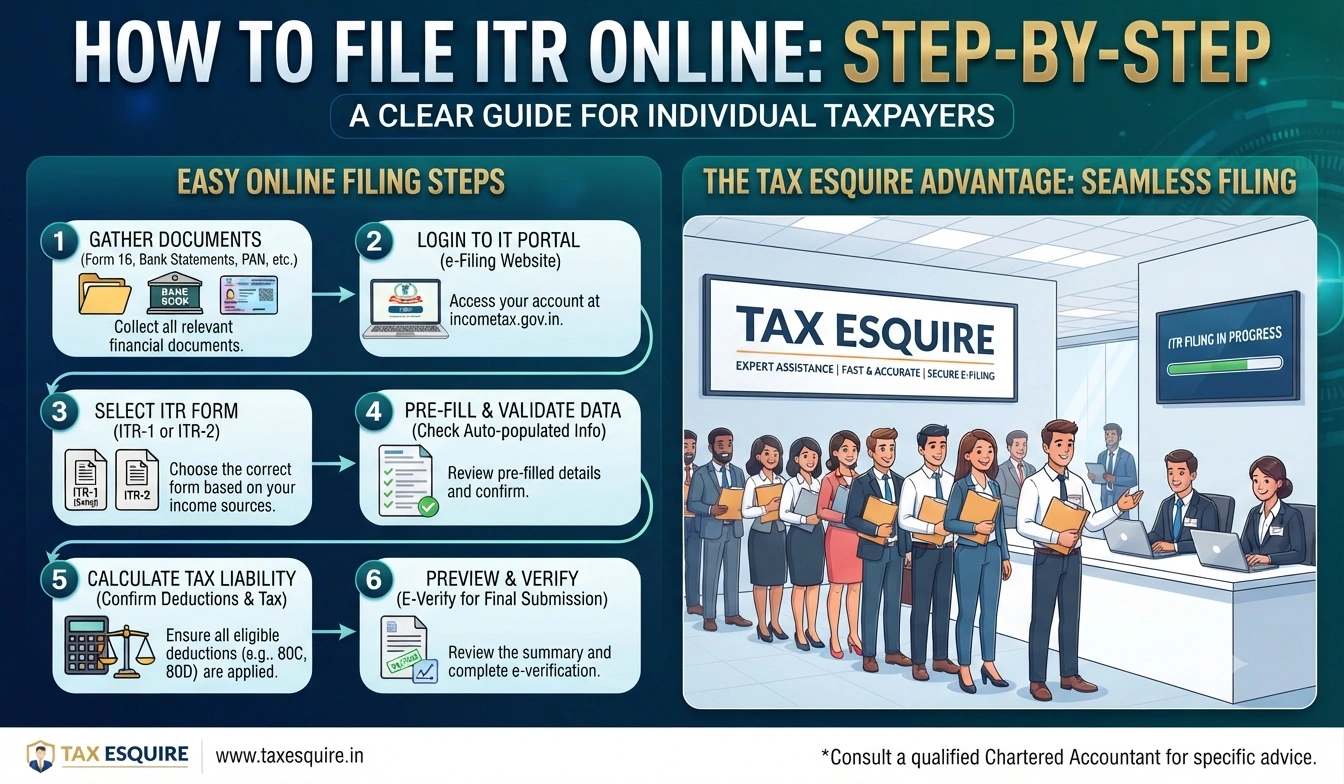
How to File ITR Online Step-by-Step
Master e-filing your income tax return with this practical walkthrough from an Indian CA
Why You Should File Your ITR Online Right Now
Look, filing your income tax return online isn't just convenient—it's become the standard way to do things. Back in 2026-2027, most people still think it's complicated. But honestly, it's much simpler than sitting with a CA for hours with piles of paperwork.
The Income Tax department's e-filing portal has gotten really user-friendly over the years. You can file from your home, at any time, and get instant acknowledgment. No more waiting for appointment slots or dealing with lost documents.
So what does this mean for you? Filing online takes about 20-30 minutes if you're organized. You get a digital receipt instantly. And you're complying with the law without stress.
Filing online gets you an instant ITR acknowledgment. You can download it immediately and share it with banks, employers, or visa consultants. No waiting for postal delivery.
What You Need Before You Start
Before you sit down to file, get these things ready. I mean, don't skip this part—it'll save you from getting stuck halfway through.
- KYC
- All salary slips, Form 16 from your employer
- Bank statements showing interest earned
- Details of all investments and deductions you made
And that's really it. You don't need to carry physical documents to file online. You just need the details from them.
Step 1: Register on the Income Tax Portal
First thing first—go to the official Income Tax e-filing portal at incometax.gov.in. Don't go to any other website. There are fake portals out there that look real but aren't.
On the homepage, you'll see a "Sign Up" button. Click it. You'll be asked to enter your KYC and email ID. Put in the correct details. The system will send you a verification link to your email.
Check your email (including spam folder) and click the verification link. Then you'll set a password. Make it strong—use uppercase, lowercase, numbers, and special characters. Something like "MyITR@2026Secure" works well.
Never share your login credentials with anyone. Not even your CA. They can ask you to give them access through the portal itself, but they shouldn't ask for your password.
Step 2: Log In and Choose Your ITR Form
Once you're registered, log in using your KYC and password. The portal will ask you to verify your identity. You can do this through KYC OTP, net banking, or by answering security questions.
After you're logged in, you'll see a dashboard. Look for "File Income Tax Return" or "e-File" option. Click it. The system will ask you which financial year you're filing for—make sure it's 2025-2026 (for filing in 2026) or 2026-2027 (for filing in 2027).
Now comes the important part: choosing the right ITR form. Most salaried people use ITR-1. If you're self-employed or have business income, you might need ITR-3 or ITR-4. If you have rental income, you might need ITR-2. Put simply, the form depends on your income sources.
| ITR Form | Who Should Use It | Income Types |
|---|---|---|
| ITR-1 | Salaried individuals | Salary, house rent, interest |
| ITR-2 | People with capital gains or rental income | Salary, capital gains, rental income |
| ITR-3 | Self-employed professionals | Business/professional income |
| ITR-4 | Small business owners | Business income under presumptive scheme |
Step 3: Fill in Your Personal Details
The form will open with a section for personal information. You'll see fields for your name, address, date of birth, and KYC. Most of this will be auto-populated from the Income Tax database. Check it carefully.
If your address has changed, update it. Make sure your email and phone number are correct. The portal will use these to send you communications about your return.
You'll also see a section asking about your residential status. If you're living in India and not a non-resident Indian (NRI), you're a resident. The form will guide you through this.
Step 4: Enter Your Income Details
This is where you fill in all your income. For salaried people using ITR-1, you'll see a field for salary income. Enter the gross salary you got during the year (April 2025 to March 2026, or April 2026 to March 2027).
Your Form 16 will show this. It'll have your gross salary, tax deducted at source (TDS), and other details. You don't need to enter line-by-line details—just the totals.
If you have interest from your savings account, you'll need to enter that too. Banks send you Form 26AS which shows interest earned. Put that number in the interest income field.
And if you have rental income from a property you own, enter that under house property income. The form will ask you for details like gross rent collected, property tax paid, and interest on home loan.
The portal auto-fetches your Form 26AS (which shows TDS and other tax details from banks and employers). You can cross-check if all your income sources have been reported correctly by the payer.
Step 5: Claim Your Deductions and Exemptions
Now you get to reduce your taxable income. The form will have sections for different deductions under Chapter VI-A of the Income Tax Act. These are things you spent money on that the government lets you deduct.
Common deductions include Section 80C (life insurance, EPF, ELSS mutual funds—up to 1.5 lakh rupees), Section 80D (health insurance premiums), and Section 80E (interest on education loans). If you made any of these investments, enter the amounts.
For example, if you paid 50,000 rupees for health insurance in the year, you can claim that under Section 80D. If you invested 1 lakh rupees in your EPF, claim that under Section 80C.
The standard deduction for salaried people is 50,000 rupees (or your gross salary if it's less than 50,000). You don't have to claim this—it's automatic.
Step 6: Review Your Tax Calculation
After you enter your income and deductions, the portal will show you your total taxable income and the tax you owe. Look at this carefully. Does the number make sense?
The form will also show how much tax was already deducted from your salary (TDS). If your TDS is higher than the tax you owe, you'll get a refund. If it's lower, you'll owe money.
For example, let's say your taxable income is 6 lakh rupees. Your tax comes to about 37,500 rupees. But your employer deducted 40,000 rupees as TDS. So you'll get a refund of 2,500 rupees.
Step 7: Add Your Bank Account Details for Refund
If you're getting a refund, you need to tell the Income Tax department where to send it. The form will ask for your bank account number, IFSC code, and account holder name.
Make sure the account holder name matches your KYC records exactly. If it says "Raj Kumar" on your KYC but "Raj K" on your bank account, update one of them first.
The IFSC code is on your checkbook or bank statement. It's an 11-character code that looks like "ICIC0000001". Make sure you type it correctly.
Double-check your bank details. If you enter the wrong account number, your refund will go to someone else's account, and it'll take weeks to recover it.
Step 8: Verify and Submit Your Return
Before you submit, the portal will let you review everything. Go through each section. Check your income, deductions, and bank details. This is your last chance to catch mistakes.
Once you're happy with everything, click the "Submit" button. The portal will ask you to verify your identity one more time. You can do this through KYC OTP, net banking, or digital signature.
The easiest way is KYC OTP. The portal will send an OTP to your registered mobile number. Enter it, and your return is submitted.
Immediately after submission, you'll get an acknowledgment number. Save this. You'll also get an ITR-V (Verification) form that you need to download and keep.
Step 9: Download Your ITR Acknowledgment
Right after you submit, download your ITR acknowledgment. This is proof that you filed your return. You'll need it for banks, loans, visa applications, and other purposes.
The acknowledgment shows your name, KYC, income, tax paid, and refund amount. It's a one-page document that you can print or keep digitally.
You should also download the ITR-V form. This needs to be printed, signed, and mailed to the Income Tax department within 30 days. But honestly, most people don't do this step anymore because the portal accepts e-verification.
Common Mistakes People Make While Filing Online
I've seen people mess up their returns in silly ways. Let me save you from these mistakes.
- Entering the wrong financial year (using 2024-2025 instead of 2025-2026)
- Forgetting to claim deductions they're eligible for, leading to unnecessary tax payments
- Entering gross salary instead of net salary in some fields
- Not updating their address if they moved
- Entering bank details incorrectly and losing their refund
- Filing too early in the financial year and then having to file an amended return
When Should You File Your ITR?
The deadline for filing ITR for 2025-2026 is July 31, 2026. For 2026-2027, it's July 31, 2027. But don't wait until the last day.
File as soon as you get your Form 16 from your employer. Usually, employers issue it by May. Filing early gives you peace of mind and helps you fix any issues before the deadline.
If you miss the deadline, you can still file, but you'll face penalties. The penalty is 5,000 rupees (or 10,000 rupees if your income is more than 50 lakh rupees).
What Happens After You File?
Once you file, the Income Tax department processes your return. This usually takes 30-45 days. You'll get an email when they accept your return.
If you're getting a refund, it'll be credited to your bank account within 45 days. Sometimes it takes longer if there's an issue with your bank details.
If the Income Tax department has questions, they'll send you a notice. Don't panic. Usually, they just want to verify something. You can respond through the portal itself.
Frequently Asked Questions
Q1: Can I file my ITR without a digital signature or KYC?
Yes, you can. You can verify through net banking using your bank's login credentials. Most banks support this. If you don't have any of these, you'll need to print the ITR-V form, sign it, and mail it to the Income Tax department.
Q2: What if I made a mistake in my return after filing?
You can file an amended return. Log back into the portal, and look for the option to file an amended ITR. You can do this anytime before the end of the financial year. For 2025-2026, you can amend until March 31, 2027.
Q3: Do I need to file an ITR if my income is below the taxable limit?
Legally, no. But I'd recommend it anyway. Filing an ITR helps if you want to get a refund of TDS, apply for a loan, or get a visa. It's proof of your income.
Q4: Can my CA file my ITR on my behalf?
Yes. You can give your CA access through the portal. Go to "Manage Your Profile" and add your CA's email ID. They can then prepare and file your return. You'll still need to verify and submit it yourself.
Q5: What if I have income from multiple sources?
You'll need to report all of it. If you have salary, rental income, and freelance income, you'll enter all three. The ITR form has separate sections for each income type. Add them all up, and the form calculates your total income and tax.
Q6: How do I know if my ITR was accepted?
You'll get an email from the Income Tax department saying your return was accepted. You can also log into the portal and check your filing status. It'll show "Accepted" if everything's fine.
Final Thoughts
Filing your ITR online is really not as scary as it sounds. The portal walks you through everything step by step. As long as you have your documents organized and you're honest about your income, you're good.
The whole process takes about 20-30 minutes if you've got everything ready. And you get instant confirmation. Compare that to the old days when people had to wait weeks for their returns to be processed.
So here's what I want you to do: gather your documents, log into the portal, and file. Don't overthink it. If you get stuck, the portal has a help section. And if you're still unsure, reach out to a CA. But honestly, most people can do this themselves.
" } ```
© 2026 Tax Esquire | Expert CA Services in Greater Noida, Uttar Pradesh
8810380146 | info.taxesquire@gmail.com | taxesquire.in
This document is for informational purposes only. For personalised tax advice, consult our chartered accountants.