New Income Tax Portal 2026: Step-by-Step Guide for Taxpayers
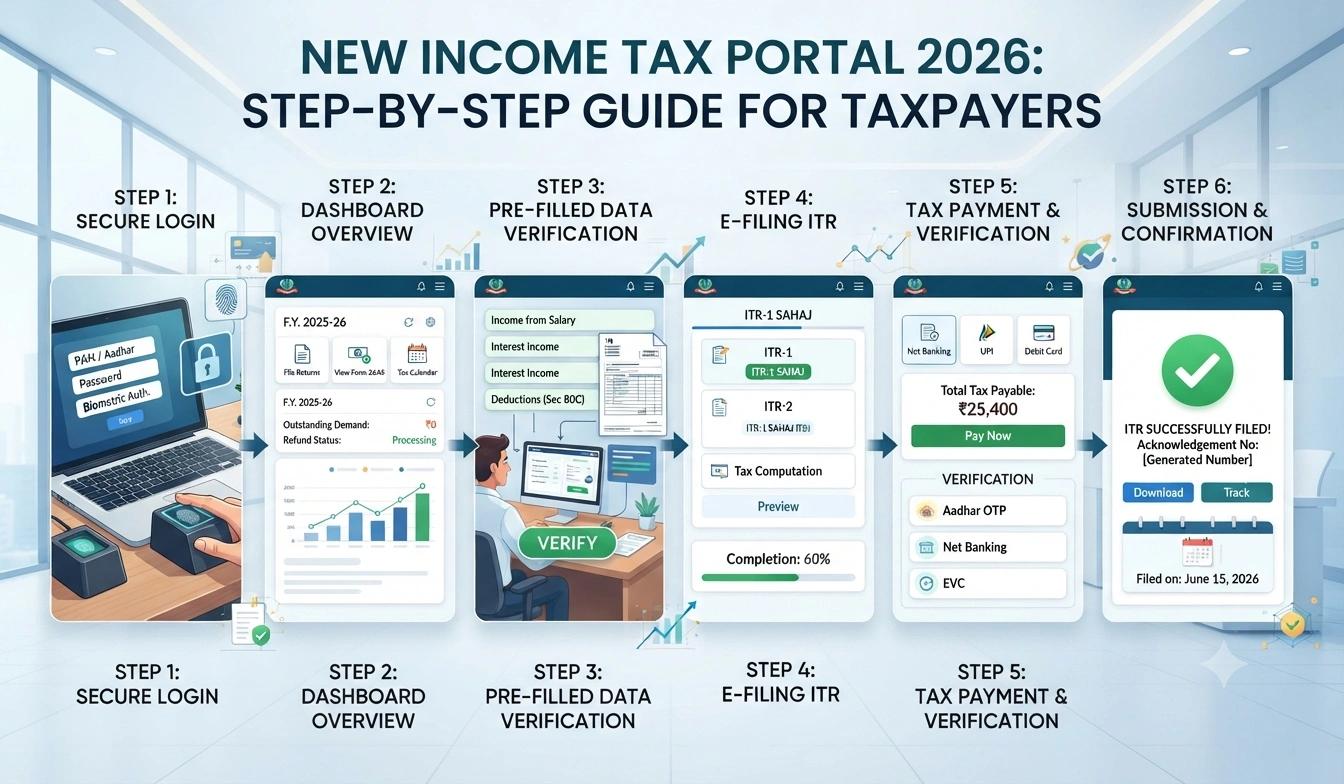
New Income Tax Portal 2026
Master the latest income tax filing process with this comprehensive walkthrough designed for every taxpayer
What's New in the Income Tax Portal 2026?
The Income Tax Department rolled out a completely redesigned portal in 2026. And honestly, it's a massive upgrade from what we had before. The interface is cleaner, faster, and way more intuitive. But what really matters is that the whole filing process got simplified.
So what does this mean for you? Put simply, you can now file your income tax returns in less time, track your refunds in real-time, and get instant updates on your compliance status. The portal now integrates directly with your bank data, investment records, and employer information.
The 2026 portal also introduced AI-powered suggestions that help you claim all eligible deductions. No more missing out on tax benefits because you forgot about something. The system flags opportunities for you automatically.
The new portal saves an average of 45 minutes per return filing. That's real time back in your pocket, and fewer headaches during tax season.
Step 1: Register and Create Your Account
Before you can file anything, you need an account on the new portal. The registration process takes about 5 minutes, and you don't need to visit any office. Everything happens online.
Head to the official Income Tax Portal website. Look for the \"New User Registration\" button on the homepage. Click it, and you'll see a form asking for your basic details.
- KYC
- Your date of birth
- Your email address (this becomes your username)
- Your mobile number
- Your preferred password
- Your residential status (resident or non-resident)
After you fill this in, the portal sends a One-Time Password (OTP) to your registered mobile number and email. Enter that OTP to verify your identity. That's it—your account is live.
The thing is, this verification step is really important. It protects your account from unauthorized access. Don't share your OTP with anyone, and don't respond to calls or messages asking for it.
Never share your login credentials, OTP, or KYC details with anyone claiming to be from the Income Tax Department. The department never asks for these details via phone or email.
Step 2: Link Your Bank and Financial Accounts
Once your account is set up, the next step is to link your financial data. This is where the 2026 portal really shines. Instead of manually entering every transaction, the system pulls data directly from your banks and investment platforms.
Log in to your account and go to the \"Link Accounts\" section. You'll see options to connect your bank accounts, mutual fund investments, stock holdings, and property records. The portal supports connections to over 500 banks and financial institutions across India.
When you click Link Bank Account," the system uses secure API connections to fetch your data. You don't need to share your banking passwords with the Income Tax Department. The connection is encrypted and happens behind the scenes.
Here's what gets pulled automatically:
- Your bank account details and transaction history
- Interest earned on savings accounts and fixed deposits
- Dividend income from mutual funds and stocks
- Capital gains from investments
- Rental income details (if you've declared properties)
- GST return information (if you're a business owner)
And that's really it—no manual data entry needed. The system automatically categorizes your income and prepares a rough draft of your tax return.
Linking your accounts saves you from the tedious job of collecting bank statements, investment statements, and other paperwork. Everything syncs automatically throughout the financial year.
Step 3: Review Your Pre-Filled Income Details
This is where things get interesting. The portal now shows you a pre-filled income statement based on data from your employer, banks, and the Income Tax Department's own records. So what does this mean? You get a head start.
Go to the \"Income\" section of your dashboard. You'll see information already filled in, such as your salary from your employer, interest from your bank accounts, and dividend income. The system pulls this from Form 26AS and TDS certificates.
Carefully review each entry. If something looks wrong—say your employer reported a higher salary than you actually got—you can correct it right there. But here's the thing: if the information matches your actual records, you don't need to do anything. Leave it as is.
The portal also shows you a summary of TDS (Tax Deducted at Source) that's been collected. This is important because it affects how much tax you'll owe at the end.
| Income Source | Pre-Filled By | Your Action |
|---|---|---|
| Salary | Your Employer | Review and confirm |
| Bank Interest | Your Bank | Review and confirm |
| TDS Certificates | Income Tax Dept | Cross-check details |
| Business Income | You (manual entry) | Add with supporting docs |
Step 4: Claim Your Deductions and Exemptions
Now comes the part where you can actually reduce your tax burden. The 2026 portal has a smart deduction assistant that guides you through every possible tax break available to you. Basically, it's like having a tax consultant right there on your screen.
Navigate to the \"Deductions\" section. The portal shows you all the sections under which you can claim exemptions. Some of the most common ones are:
- Section 80C: Life insurance premiums, PPF contributions, ELSS mutual funds (up to ₹1.5 lakhs)
- Section 80D: Health insurance premiums for you and your family
- Section 80E: Interest paid on education loans
- Section 80G: Donations to approved charitable organizations
- Section 24: Interest on home loans
- Section 87A: Rebate for individuals with income up to ₹5 lakhs
For each deduction, the portal asks you to upload supporting paperwork. For instance, if you're claiming life insurance premiums under Section 80C, you'll need to upload your insurance policy and premium receipts. The system then verifies these documents automatically.
Here's what I mean: the portal doesn't just accept your word for it. It cross-checks your claims against data from insurance companies, banks, and mutual funds. If there's a mismatch, the system flags it immediately and asks you to clarify.
Smart deduction tracking means you won't accidentally miss a deduction. The portal reminds you of opportunities you might have overlooked, potentially saving you thousands of rupees in taxes.
Step 5: Choose the Right ITR Form
The Income Tax Department offers different ITR forms depending on the nature of your income. The 2026 portal makes this selection super easy—it recommends the right form based on your income profile.
But let's be clear about what each form is for:
| ITR Form | Who Should Use It |
|---|---|
| ITR-1 (Sahaj) | Salaried individuals with income up to ₹50 lakhs, no business income |
| ITR-2 | Individuals with income from multiple sources, capital gains |
| ITR-3 (Vikas) | Self-employed individuals and business owners |
| ITR-4 (Sugam) | Individuals with presumptive business income under Section 44AD |
| ITR-5 | Partnerships and LLPs |
The portal's wizard asks you a series of questions about your income sources. Based on your answers, it automatically recommends the right form. You can override this recommendation if you want, but honestly, the system's suggestion is usually spot on.
Filing the wrong ITR form can lead to your return being rejected or scrutiny from the Income Tax Department. If you're unsure, consult a tax professional before submitting.
Step 6: Fill in Additional Income and Expenses
Not all income gets pre-filled by the system. If you have income that isn't automatically reported—like freelance work, rental income from a property you own, or income from a side business—you'll need to add it manually.
Go to the \"Other Income\" section and enter these details. For each income source, you'll need to provide:
- The nature of income (rental, professional fees, business, etc.)
- The gross amount earned
- Any expenses incurred to earn that income
- The net income (gross minus expenses)
- Supporting documentation
Let me give you a practical example. Say you earned ₹2 lakhs from freelance writing in 2026. You also spent ₹30,000 on a laptop and software for that work. You'd enter ₹2 lakhs as gross income and ₹30,000 as expenses, resulting in a net income of ₹1.7 lakhs. Upload invoices, receipts, and any contracts to back this up.
The thing is, the Income Tax Department cross-checks this information. If your bank statements don't show deposits matching your reported income, the system flags it. So be accurate and honest.
Step 7: Verify Your Return Before Submission
Before you hit the submit button, take time to review everything. The portal shows you a complete summary of your return. This is your last chance to catch any errors.
The summary page displays:
- Total income calculated by the system
- All deductions and exemptions claimed
- Taxable income (income minus deductions)
- Tax liability calculated based on the current tax slabs
- TDS already paid
- Refund due or additional tax payable
Go through each section carefully. If you spot an error, click \"Edit\" next to that section and make corrections. The portal lets you go back and change anything until you actually submit the return.
And here's something important: the portal now shows you a risk assessment. It tells you if your return has any red flags that might trigger scrutiny. For example, if your claimed deductions are unusually high compared to your income, the system warns you. This helps you decide whether to adjust your claims before submitting.
The risk assessment feature helps you avoid unnecessary scrutiny. You can make adjustments before filing, reducing the chance of the Income Tax Department asking questions later.
Step 8: Submit Your Return and Get Acknowledgment
Once you're satisfied with your return, it's time to submit. Click the \"Submit\" button, and the portal asks you to authenticate your submission. In 2026, you have multiple ways to do this:
- Document OTP: The system sends an OTP to your Document -linked mobile number
- Net Banking: Use your bank's login credentials to authenticate
- Digital Signature: If you have a Class 3 digital certificate
- E-sign: Third-party e-signature service
Choose the authentication method that's most convenient for you. The Document OTP option is the easiest and works for almost everyone.
After authentication, the system processes your return and generates an acknowledgment number. This is your proof that you've filed. The portal displays this number on your screen, and you get an email confirmation too. Save both for your records.
The acknowledgment shows:
- Your acknowledgment number (ARN)
- The date and time of filing
- Your total income and tax liability
- Refund amount (if applicable)
Your return is considered filed only after you complete the authentication step. Filling out the form and clicking submit isn't enough—you must verify and authenticate to finalize the filing.
Step 9: Track Your Refund Status
If you're owed a refund, you don't have to wait in the dark. The 2026 portal gives you real-time updates on your refund status. This is one of the biggest improvements from the old system.
Log in to your account and go to \"Refund Status.\" The portal shows you exactly where your refund is in the processing pipeline. You'll see:
- Refund amount sanctioned by the Income Tax Department
- Status (processing, approved, disbursed)
- Expected date of credit to your bank account
- Actual date of credit (once processed)
In most cases, refunds are processed within 30 to 45 days of filing. But some returns go through scrutiny, which can delay the refund. The portal keeps you informed at every stage.
The refund gets credited directly to the bank account you provided while filing. You don't need to do anything else. Just wait for the credit to appear.
Step 10: Respond to Notices and Queries
Sometimes the Income Tax Department needs clarification on your return. They send you a notice or ask for additional information. The new portal makes responding to these requests straightforward.
When you get a notice, it appears in your portal dashboard under \"Notices and Demands.\" You can view the notice, understand what information is being asked for, and upload your response directly through the portal. You don't need to visit an office or send physical documents.
The portal tells you the deadline for responding. Missing this deadline can result in penalties, so mark it on your calendar. Most notices give you 30 days to respond.
Common reasons for notices include:
- Mismatch between your reported income and TDS received
- Unusually high deductions compared to income
- Missing supporting documentation
- Discrepancies in property or investment details
- Previous year's unfiled return
If you get a notice, don't panic. Most can be resolved with proper documentation. If you're unsure how to respond, consult a tax professional.
Common Mistakes to Avoid
After helping hundreds of taxpayers file through the new portal, I've seen patterns in what goes wrong. Here are the mistakes you should avoid:
- Filing too late: The deadline is usually July 31st. Don't wait until the last day—servers get congested, and you might face issues.
- Not verifying pre-filled data: Just because information is pre-filled doesn't mean it's correct. Always cross-check against your own records.
- Forgetting to claim eligible deductions: Many people miss out on deductions they're entitled to. Use the portal's deduction wizard to catch everything.
- Providing incomplete documentation: Upload all supporting papers. The portal might reject your return if crucial documents are missing.
- Mixing up financial years: Make sure you're reporting 2026 income in the 2026-27 return, not in the 2027-28 return.
- Not responding to notices: Ignoring a notice from the Income Tax Department can lead to penalties and prosecution.
Frequently Asked Questions
Q1: Can I file my 2026 return if my income is below the taxable limit?
Yes, you can—and sometimes you should. If your income is below the taxable limit but you've paid TDS, filing helps you get a refund. Also, if you have business income or capital gains, filing is compulsory regardless of the total amount.
Q2: What happens if I file a return and then realize I made a mistake?
The Income Tax Act allows you to file a revised return. You can do this anytime before the end of the financial year or within two years from the end of the original assessment year, whichever is earlier. The portal makes it easy—just file a fresh return marked as \"Revised\" and submit it with corrections.
Q3: How long does it take for the Income Tax Department to process my return?
Typically, simple returns get processed within 30 to 45 days. But if your return triggers scrutiny or has discrepancies, processing can take several months. The portal updates you on the status, so you'll know where things stand.
Q4: Do I need a digital signature to file my return on the 2026 portal?
No, a digital signature isn't compulsory. You can authenticate your return using Document OTP, net banking, or e-sign. Digital signature is just one of several options available.
Q5: What if I have income from multiple countries? How do I report it?
If you're a resident of India, you need to report your worldwide income, including foreign income. The portal has a dedicated section for foreign income. You'll need to report the income in Indian rupees, convert at the exchange rate on the date you received it. Foreign tax paid can be claimed as a credit against Indian taxes.
Q6: Can my spouse or family member file a return on my behalf?
Not directly. Each person must file their own return using their own KYC and account. However, someone can help you prepare the return on the portal if they have access to your login credentials. But the authentication and final submission must come from you.
Key Takeaways
The new Income Tax Portal 2026 has made filing returns faster and easier than ever before. Here's what you need to remember:
- Registration is quick and happens entirely online—no office visits needed.
- Link your bank accounts to get automatic data syncing and pre-filled income details.
- Use the deduction wizard to make sure you don't miss any tax breaks.
- Choose the right ITR form based on your income profile—the portal guides you.
- Review everything carefully before submitting, and use the risk assessment feature to avoid scrutiny.
- Keep your acknowledgment number safe—it's your proof of filing.
- Track your refund in real-time through the portal dashboard.
Final Thoughts
Filing your income tax return doesn't have to be stressful. The 2026 portal puts all the tools you need right in your hands. The system is designed to make your life easier, from pre-filling data to suggesting deductions to tracking your refund.
But remember: accuracy is everything. Take your time, review your details carefully, and don't rush through the process. If you're unsure about anything, it's worth getting professional help. A tax consultant can help you optimize your return and ensure you're compliant with all regulations.
The Income Tax Department is investing heavily in technology to make compliance easier. Use these tools to your advantage. File on time, keep your paperwork organized, and stay informed about changes to tax laws. That's the best approach to staying stress-free during tax season.
" } ```
© 2026 Tax Esquire | Expert CA Services in Greater Noida, Uttar Pradesh
8810380146 | info.taxesquire@gmail.com | taxesquire.in
This document is for informational purposes only. For personalised tax advice, consult our chartered accountants.