How to Use an EMI Calculator Before Taking a Business Loan
How to Use an EMI Calculator Before Taking a Business Loan
Master the math behind your business loan payments and make smarter financial decisions
Why You Really Need to Check Your EMI Before Borrowing
Look, I've seen this happen too many times. An entrepreneur walks into a bank, gets approved for a business loan, and signs the paperwork without really understanding what they're paying each month. Then reality hits. The EMI (Equated Monthly Installment) is higher than expected, cash flow gets tight, and suddenly the business is struggling.
And here's the thing—most business owners don't realize that an EMI calculator is their best friend before taking any loan. It's free. It's simple. It takes five minutes. So why do so many people skip this step?
The answer is simple: they don't know what to do with it. This guide walks you through the entire process, step by step, so you can make decisions based on numbers, not gut feeling.
Using an EMI calculator helps you understand your true monthly cost before committing to a loan, prevents cash flow problems, and lets you compare different loan options side by side.
What Exactly Is an EMI Calculator?
An EMI calculator is basically a tool that takes three pieces of information and spits out your monthly payment. That's really it. But understanding what goes into that calculation is crucial.
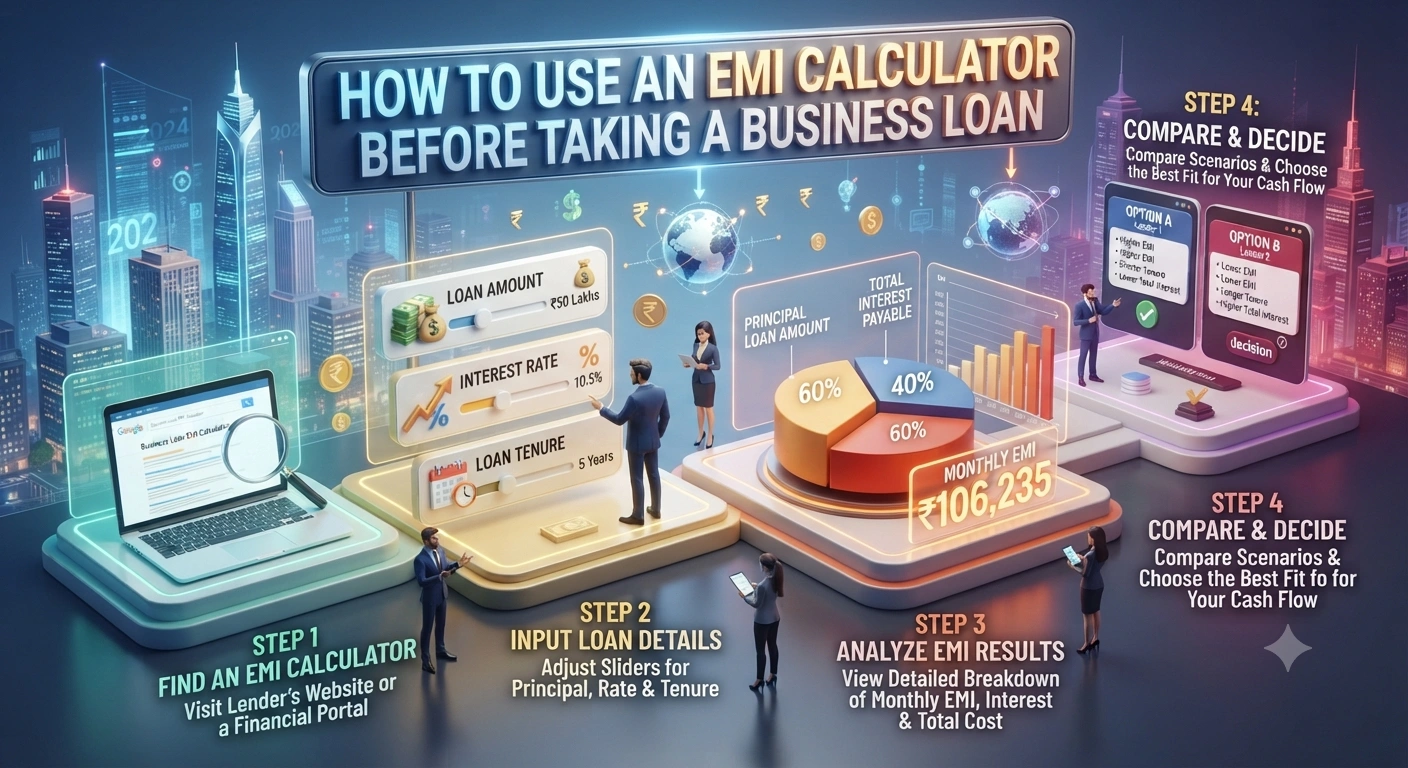
The three inputs are: the loan amount (principal), the interest rate, and the loan tenure (how many months you'll pay). Put these in, and the calculator shows you your fixed monthly payment.
But here's what most people don't realize—the EMI isn't just about dividing the loan amount by the number of months. The interest gets calculated on the remaining balance each month. So your first payment has more interest, and your last payment has less. That's why the calculator exists. It does the heavy math for you.
The formula behind it is pretty straightforward: EMI = [P × R × (1 + R)^N] / [(1 + R)^N - 1], where P is principal, R is monthly interest rate, and N is number of months. But honestly, you don't need to memorize this. The calculator does it for you.
Step-by-Step: How to Use an EMI Calculator
Let me break this down into actual steps you can follow right now.
Step 1: Know Your Loan Amount
First things first—how much money do you actually need? This isn't just about the amount you want. It's about the amount your business truly needs to function and grow.
Let's say you're buying machinery for your manufacturing unit. You need ₹15 lakhs. That's your principal amount. But wait—don't just borrow ₹15 lakhs and assume that's what you'll get. Banks charge processing fees, insurance, and other costs upfront. So if you need ₹15 lakhs in your account, you might need to borrow ₹16 lakhs to cover these charges.
So the first step is crystal clear: figure out the exact amount you need in your business account after all charges.
Step 2: Get the Interest Rate
This is where it gets tricky because interest rates aren't always fixed. Banks offer different rates based on your credit score, business history, collateral, and relationship with them.
The best approach? Call your bank or check their website for the current lending rate for business loans in 2027. Most banks show indicative rates, but your actual rate might be higher or lower. Ask them directly. Don't assume.
For this example, let's say the bank quotes 9.5% per annum. That's your interest rate. But here's the important bit—most EMI calculators ask for the monthly interest rate, not the annual rate. So you need to divide 9.5% by 12, which gives you about 0.79% per month.
Don't confuse the annual interest rate with the monthly rate. Most EMI calculators need the monthly rate. If you enter the annual rate by mistake, your EMI will be wildly off.
Step 3: Decide Your Loan Tenure
Tenure is how long you'll take to repay the loan. It's usually offered in months. Business loans typically range from 12 months to 84 months (7 years), depending on the lender and loan type.
Here's where most people mess up—they pick the longest tenure to get the lowest monthly payment. But that means you'll pay way more interest overall. Let me show you with numbers.
Say you borrow ₹10 lakhs at 10% per annum. If you repay in 36 months (3 years), your EMI is about ₹32,267. Total interest paid: ₹1,61,612. But if you stretch it to 60 months (5 years), your EMI drops to ₹21,247. Sounds better, right? But total interest paid jumps to ₹2,74,420. You're paying ₹1,12,808 extra just to lower the monthly payment.
So pick a tenure that balances two things: (1) a monthly payment your business can comfortably handle, and (2) not so long that you're drowning in interest.
Step 4: Enter the Numbers and Calculate
Now you have all three numbers. Let's use a real example:
- Principal: ₹15,00,000
- Annual Interest Rate: 9.5%
- Tenure: 48 months (4 years)
You enter these into the calculator (converting 9.5% annual to 0.79% monthly), and it shows you: EMI = ₹36,157 per month.
Total amount you'll pay back: ₹36,157 × 48 = ₹17,35,536. Total interest: ₹2,35,536.
Step 5: Check the Amortization Schedule
Most good EMI calculators show you an amortization schedule. This is a month-by-month breakdown of how much of your EMI goes toward principal and how much goes toward interest.
In month 1, your ₹36,157 EMI breaks down to about ₹11,875 principal and ₹24,282 interest. By month 48 (the last month), it's about ₹35,887 principal and ₹270 interest. This is important because it shows you how the loan is being paid off over time.
Where to Find Free EMI Calculators
You don't need to pay for this. Most banks and financial websites offer free EMI calculators. Here are your best bets:
- Your bank's official website—HDFC, ICICI, Axis, SBI all have calculators
- Financial comparison websites like BankBazaar, Paisabazaar, and MoneyControl
- Google—just search "EMI calculator" and Google's own calculator pops up
- Microsoft Excel—if you're comfortable with formulas, you can build your own
- Mobile apps from banks and fintech companies
My recommendation? Use your bank's calculator first because the interest rates shown there are usually accurate for that specific lender. Then cross-check with one or two other calculators to make sure the numbers match.
Practical Example: Comparing Two Loan Offers
Let's say you're comparing two business loan offers. This is where an EMI calculator becomes your secret weapon.
| Parameter | Bank A | Bank B |
|---|---|---|
| Loan Amount | ₹20 Lakhs | ₹20 Lakhs |
| Interest Rate | 9.5% p.a. | 10.5% p.a. |
| Tenure | 60 months | 48 months |
| Monthly EMI | ₹42,495 | ₹48,290 |
| Total Interest | ₹5,49,700 | ₹3,18,320 |
Bank A looks cheaper on EMI (₹42,495 vs ₹48,290), but you pay ₹2,31,380 more in total interest. Bank B's higher monthly payment saves you over ₹2 lakhs in interest. Which is better? That depends on your cash flow. Can your business handle ₹48,290 every month? If yes, Bank B is smarter. If no, you might have to go with Bank A, but you'll know upfront that it costs more.
This is why the calculator matters. Without it, you're just guessing.
Important Things to Remember Beyond the EMI
Here's the thing—the EMI calculator only shows you the interest and principal. It doesn't show you everything you'll pay.
- Processing fees (usually 0.5% to 2% of loan amount, charged upfront)
- Insurance premiums (credit protection insurance, sometimes compulsory)
- Prepayment penalties (some loans charge a fee if you pay early)
- Annual maintenance charges (some lenders charge this)
- GST on interest (yes, you pay 18% GST on the interest component)
- Late payment charges (if you miss a payment)
So when you're evaluating a loan, add all these costs on top of the EMI. Ask your bank for a complete statement of all charges before you sign anything. Don't just rely on the EMI number.
Compliance and Tax Considerations in 2027
As a business owner, you need to know the tax angle too. The interest you pay on a business loan is tax-deductible. That's a big deal.
If your business is in the 30% tax bracket, and you're paying ₹5 lakhs in interest per year, you save ₹1.5 lakhs in taxes. This effectively reduces your true cost of borrowing. So when you're calculating the real cost of a loan, factor this in.
Also, make sure you keep all loan-related paperwork for compliance. In 2027, the Income Tax Department is strict about this. You'll need the loan agreement, EMI payment receipts, and interest certificates (Form 16A) for your returns.
If you're a GST-registered business, you can claim input tax credit on GST paid on loan-related services. Keep invoices for processing fees, insurance, and other charges.
Don't ignore the tax and compliance side of business loans. The interest deduction is real money saved, but you need proper documentation to claim it. Missing paperwork can lead to income tax notices.
What If You Want to Pay Off the Loan Early?
Some calculators show you a prepayment scenario. This is useful if you're thinking about paying off the loan faster.
Let's say you took a 60-month loan but your business does really well in year 2, and you want to pay it off in 48 months instead. The calculator can show you how much total interest you'd save. But here's the catch—many banks charge a prepayment penalty. It's usually 1% to 3% of the outstanding principal. So before you celebrate the interest savings, ask your bank about prepayment terms.
And honestly, if your business is doing well enough to pay off the loan early, that's a good problem to have. Just make sure the penalty doesn't eat up all your savings.
Common Mistakes People Make with EMI Calculators
After working with hundreds of business owners, I've seen these mistakes over and over.
- Using the annual interest rate instead of monthly rate—this inflates the EMI hugely
- Not including processing fees and insurance in the loan amount—then being shocked at the actual disbursement
- Picking tenure based only on EMI, not on total interest paid—ends up costing way more
- Ignoring the amortization schedule—then being surprised that most early payments go to interest
- Not comparing multiple loan offers—settling for the first quote without checking alternatives
- Forgetting to factor in GST on interest for tax calculations—missing out on actual deductions
Don't make these mistakes. Take 30 minutes to run the numbers properly. It'll save you thousands of rupees.
Questions to Ask Your Bank After Using the Calculator
Once you've run the numbers, here are the questions you should ask your bank before signing:
- Is the interest rate fixed or floating? If floating, what's the reset frequency and how much can it change?
- What are all the charges (processing, insurance, maintenance) and when are they debited?
- Can I prepay without penalty, or is there a charge?
- What happens if I miss a payment? What's the late fee?
- Will you provide a monthly statement showing principal, interest, and outstanding balance?
- Is there a moratorium period (payment holiday) available?
- What collateral or guarantee is required?
Get clear answers to all of these. Don't let the bank rush you. You're about to commit to years of payments. Make sure you understand every detail.
Frequently Asked Questions
Q1: Can the EMI change after I take the loan?
It depends on whether your interest rate is fixed or floating. If it's fixed, your EMI stays the same for the entire tenure. If it's floating, the interest rate can change based on market conditions, which means your EMI can increase or decrease. Most business loans come with floating rates linked to the bank's base rate or MCLR. So yes, your EMI can change. That's why you need to ask your bank about this before borrowing.
Q2: What's the difference between EMI and the total amount I'll pay?
EMI is just the monthly payment. Total amount = EMI × number of months. The difference between total amount and loan amount is the interest you're paying. For example, if you borrow ₹10 lakhs with an EMI of ₹20,000 for 60 months, the total amount is ₹12 lakhs. The ₹2 lakhs difference is interest. The EMI calculator shows you all this, but make sure you understand the difference.
Q3: Is it better to take a longer tenure to reduce EMI?
Not always. Yes, longer tenure means lower EMI. But you'll pay way more interest overall. It's better to pick a tenure that balances your monthly cash flow with total interest cost. If your business can handle a higher EMI, go for a shorter tenure and save on interest. If cash flow is tight, go for longer tenure but know you're paying more. There's no one-size-fits-all answer.
Q4: Should I use a calculator from the bank or a third-party website?
Use both. Start with your bank's calculator because the interest rates shown there are accurate for that lender. Then cross-check with a third-party calculator to make sure the math is right. If the numbers match, you're good. If they don't, ask your bank why there's a difference. Most likely it's because of different interest rates or the way fees are calculated.
Q5: Can I negotiate the interest rate after the calculator shows me the EMI?
Absolutely. The interest rate shown in the calculator is usually the base rate. But banks have some flexibility, especially if you have a good credit score, strong business financials, or a long relationship with the bank. Don't just accept the first quote. Ask if they can reduce it. Even 0.5% lower makes a big difference over the loan tenure. Always negotiate.
Key Takeaways
So here's what you need to do before taking any business loan:
- Know your exact loan amount (including all charges)
- Get the interest rate from your bank (don't assume)
- Pick a tenure that balances monthly payment and total interest
- Use an EMI calculator to see the numbers clearly
- Compare multiple loan offers using the same tenure and amount
- Check the amortization schedule to understand how you're paying
- Ask about all charges, prepayment terms, and floating rate risks
- Factor in tax benefits (interest is deductible)
- Keep all paperwork for compliance and tax purposes
And honestly, this whole process takes maybe an hour. Spending one hour now saves you from making a ₹5-10 lakh mistake. That's a no-brainer.
Conclusion
Business loans can be a game-changer for your company. But only if you borrow smart. Using an EMI calculator before you sign the paperwork is the difference between a loan that helps your business grow and a loan that drains your cash flow every month.
The calculator isn't magic. It's just a tool. But it's a tool that puts the power in your hands. You get to see exactly what you're paying, compare different options, and make a decision based on numbers, not sales talk.
So before you walk into that bank, or before you click "apply" on that online form, spend 30 minutes with an EMI calculator. Run the numbers. Compare offers. Ask tough questions. Your future self will thank you.
" } ```
© 2026 Tax Esquire | Expert CA Services in Greater Noida, Uttar Pradesh
8810380146 | info.taxesquire@gmail.com | taxesquire.in
This document is for informational purposes only. For personalised tax advice, consult our chartered accountants.