Invoice Management System (IMS) Under GST
Introduction
Since the implementation of GST in India, one of the major challenges for businesses and tax authorities has been ensuring the accuracy of Input Tax Credit (ITC) claims. Mismatched invoices, delayed reconciliations, and lack of real-time communication between suppliers and recipients often led to disputes and compliance risks.
To address these issues, the GST Network (GSTN) introduced the Invoice Management System (IMS)—a structured mechanism designed to bring transparency and control into invoice-level data validation. IMS represents a shift from passive reporting to active invoice confirmation, where recipients play a direct role in validating transactions before claiming ITC.
What is IMS under GST?
The Invoice Management System (IMS) is an online facility available on the GST portal that allows recipients (buyers) to view, verify, and act on invoices uploaded by suppliers in their GSTR-1 returns.
It serves as a critical link between:
● GSTR-1 (Supplier’s outward supplies)
● GSTR-2B (Recipient’s ITC statement)
Through IMS, taxpayers can ensure that only valid and accurate invoices are considered for ITC, thereby reducing the risk of errors, fraud, and tax disputes.
Actions Available to Taxpayers in IMS
Accept: Confirms that the invoice is correct and eligible for ITC.
Reject: Indicates discrepancies in the invoice. The supplier must correct and refile.
Pending: Used when verification is incomplete or additional clarification is required.
Amendment Tracking: Allows monitoring of corrected invoices submitted by suppliers.

Objectives of IMS
The introduction of IMS is driven by several key objectives:
● Enhancing ITC accuracy: Ensuring ITC is claimed only on verified invoices
● Reducing mismatches: Eliminating discrepancies between supplier and recipient data
● Improving transparency: Providing visibility into invoice-level details
● Strengthening compliance: Encouraging timely validation of invoices
● Preventing fraud: Reducing fake or duplicate invoice claims
Key Features of Invoice Management System
IMS introduces several practical and compliance-oriented features:
Accept / Reject / Pending Options: The IMS allows recipients to take clear action on each document whether it’s an invoice, credit note, or amendment. You can mark it as Accepted, Rejected, or Pending for a specific tax period. This gives sufficient time for verification or dispute resolution. If no action is taken, the system treats it as deemed accepted.

Flexible ITC Reversal Mechanism: Taxpayers have better control over Input Tax Credit (ITC). You can declare the exact ITC amount you have claimed and reverse only the relevant portion when required. If no ITC was claimed earlier, there is no need for any reversal.
Remarks for Clear Communication: While rejecting or keeping a document pending, you can add remarks. These comments are visible in GSTR-2B and on the supplier’s dashboard, helping both parties communicate effectively and resolve mismatches faster.
Comprehensive Dashboard Summary: IMS provides a structured dashboard where all inward supplies are categorized (such as B2B invoices, credit notes, and amendments). It also shows a summary of actions Accepted, Rejected, Pending, or No Action making tracking and decision-making easier.
Seamless GSTR-2B Integration: Only the documents marked as Accepted are reflected in GSTR-2B for ITC claims. Pending or rejected records are excluded until they are resolved. If no action is taken before filing GSTR-3B, the system considers them accepted automatically.
Bulk Actions & Easy Downloads: To save time, users can select multiple invoices and take actions in bulk. Additionally, data can be downloaded in Excel format for review, reconciliation, or audit purposes.
Supplier Amendment Facility: Suppliers can amend previously filed invoices using GSTR-1A. Once updated, these changes are reflected in IMS for the recipient to review again in the following tax period.
Compliance-Friendly System: IMS is designed to simplify compliance rather than increase workload. Since inaction leads to deemed acceptance, taxpayers don’t need to manually act on every unchanged invoice, making the process more efficient.
Defined Timeline for Pending Actions: From the October 2025 tax period onwards, certain records can be kept pending for one tax period, one month for monthly filers and one quarter for quarterly filers ensuring timely resolution.
Precise ITC Declaration Facility: A new feature enables taxpayers to declare the exact ITC claimed and reverse it either partially or fully, offering greater accuracy and flexibility in tax reporting.
How IMS Works (Step-by-Step Process)
Online
Invoice Upload by Supplier: The supplier uploads invoice details in GSTR-1.
Invoice Visibility in IMS: The invoice becomes visible to the recipient in the IMS dashboard.
Recipient Review: The recipient verifies invoice details such as GSTIN, amount, and tax.
Action by Recipient: The recipient chooses: Accept, Reject, or Pending.
Accept: When a recipient accepts an invoice, it gets included in their auto-generated ITC statement, i.e., GSTR-2B, which is prepared on the 14th of every month.
Reject: If the recipient rejects an invoice uploaded by the supplier, that invoice will not be reflected in their ITC statement or GSTR-2B.
Pending: In cases where the recipient marks an invoice as pending, it is excluded from the current month’s GSTR-2B. Instead, the IMS system carries it forward to the following month for further action.
No Action: If no action is taken by the recipient on an invoice, the system treats it as deemed accepted, and it is automatically included in the recipient’s GSTR-2B.
Impact on ITC: Accepted invoices are reflected in GSTR-2B and become eligible for ITC.

Excel-Based IMS Offline Utility
To assist businesses handling large volumes of invoices, GSTN has introduced an Excel-based offline utility.
Key Advantages:
● Enables bulk invoice processing
● Allows offline review and action
● Reduces time and manual effort
● Ideal for large enterprises and corporates
Step by step
Step 1: Login to the GST Portal-- Service--Returns-- IMS Dashboard--Click Download Details(in JSON Form)
Step 2: Open the IMS Offline Tool, import the JSON, and mark your actions.
Step 3: Go back to the IMS Dashboard--Offline tab--Upload JSON

IMS and Input Tax Credit (ITC)
IMS directly impacts ITC claims. Traditionally, ITC was claimed based on auto-generated data, often leading to mismatches. With IMS:
● ITC is validated before claim
● Only accepted invoices contribute to GSTR-2B
● Risk of wrongful ITC claims is reduced
This leads to stronger compliance and fewer departmental notices.
Important Dates & Timeline under IMS
IMS follows the GST return cycle:
● Invoice Upload: As per GSTR-1 due dates
● Action Window: Before generation of GSTR-2B
● ITC Availability: Based on accepted invoices
Timely action is essential to ensure ITC is not delayed or denied.
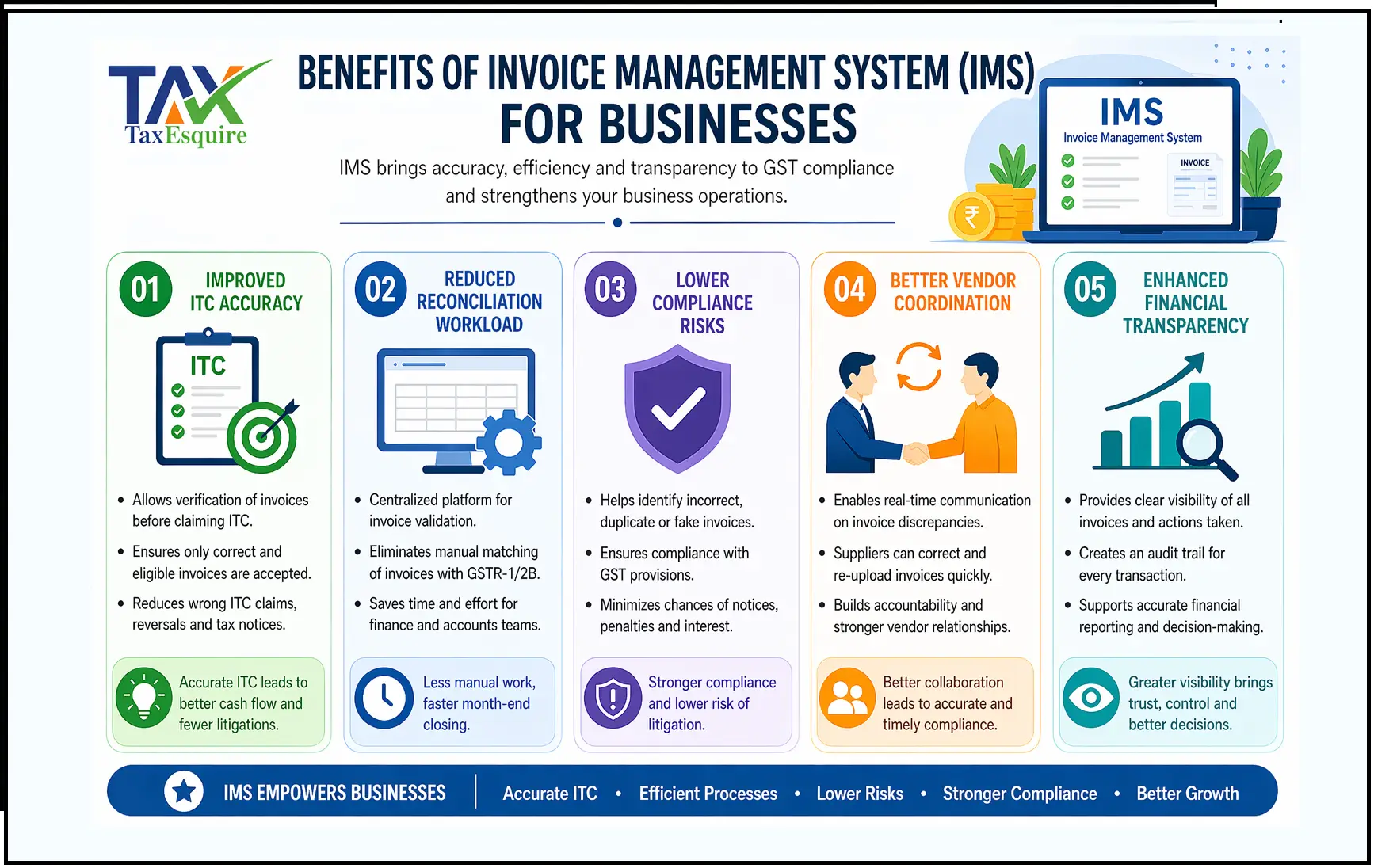
Benefits of IMS for Businesses
1. Improved ITC Accuracy: One of the biggest advantages of IMS is the accuracy it brings to Input Tax Credit (ITC) claims. Earlier, businesses relied heavily on auto-generated data like GSTR-2B, often leading to incorrect ITC claims due to mismatches or supplier errors. IMS changes this by allowing taxpayers to actively verify invoices before claiming ITC.
2. Reduced Reconciliation Workload: Traditionally, businesses spent significant time reconciling purchase data with GST returns. This process was manual, time-consuming, and error-prone.
IMS simplifies this by providing a centralized platform for invoice validation, reducing the need for extensive post-filing reconciliation.
3. Lower Compliance Risks: GST compliance is highly sensitive, and errors in ITC claims can lead to penalties, interest, or notices from tax authorities. IMS significantly reduces these risks by ensuring only correct and verified data is used.
4. Better Vendor Coordination: IMS encourages real-time communication between buyers and suppliers. Instead of discovering errors months later, businesses can immediately flag incorrect invoices.
5. Enhanced Financial Transparency: IMS improves visibility into transactions by ensuring that all invoices are reviewed, tracked, and validated systematically.
Challenges & Practical Issues in IMS
Despite its advantages, IMS may present some challenges:
● Learning curve for new users
● Dependence on supplier accuracy
● Time-sensitive actions
● Increased compliance responsibility
Common Errors & How to Avoid Them
Common Mistakes:
● Not reviewing invoices regularly
● Missing action deadlines
● Incorrect rejection of invoices
Prevention Tips:
● Conduct monthly reconciliation
● Set internal compliance timelines
● Use accounting/GST software
IMS vs Previous GST Matching System
IMS is applicable to:
● All GST-registered taxpayers claiming ITC
● Medium and large businesses
● Companies with multiple vendors
● Organizations requiring strict compliance systems
Best Practices for IMS Compliance
● Review invoices on a monthly basis
● Maintain communication with suppliers
● Track pending invoices regularly
● Integrate IMS with ERP systems
● Train staff on compliance procedures
Conclusion
The Invoice Management System marks a significant advancement in GST compliance. By empowering taxpayers to validate invoices before claiming ITC, IMS enhances accuracy, reduces disputes, and promotes transparency.
Businesses that adopt IMS proactively and implement proper processes will not only ensure compliance but also gain better control over their tax and financial operations.
Author: CA POONAM GUPTA & ADV LOKESH GUPTA
© 2026 Tax Esquire | Expert CA Services in Greater Noida, Uttar Pradesh
8810380146 | info.taxesquire@gmail.com | taxesquire.in
This document is for informational purposes only. For personalised tax advice, consult our chartered accountants.