How to Check Bill of Entry (BoE)Status on ICEGATE ?
Introduction
In the import process, timely customs clearance is critical to avoid delays, penalties, and disruptions in business operations. One of the most important documents in this process is the Bill of Entry (BoE), which serves as a legal declaration filed with customs authorities for the clearance of imported goods.
Monitoring the status of the Bill of Entry through the ICEGATE portal plays a crucial role in ensuring compliance, tracking shipment progress, and enabling seamless tax credit claims.
Many importers file the Bill of Entry and assume the job is done. In reality, tracking its status is just as important as filing it, especially if you want smooth clearance and timely Input Tax Credit (ITC).
What is ICEGATE and Why It Matters
ICEGATE is the online system used by Indian Customs for filing and processing import/export documents. It connects importers, customs brokers, and government departments on a single platform.
From a practical standpoint, this is where your Bill of Entry actually “moves” through different stages—assessment, duty verification, and clearance.
If you’re not tracking it here (directly or via GST portal), you’re essentially working blind.
Understanding the Bill of Entry (BoE)
A Bill of Entry is a mandatory document submitted by an importer or customs broker upon arrival of goods in India. It contains essential details such as importer information, goods description, value, applicable duties, and port details.
This document is critical not only for customs clearance but also for determining tax liabilities and claiming Input Tax Credit (ITC) under GST.
Why Checking Bill of Entry Status is required?
Regular tracking of the Bill of Entry status is essential for multiple reasons:
• Ensures smooth customs clearance and avoids delays
• Helps verify tax payments such as IGST and customs duty
• Enables timely claim of Input Tax Credit (ITC)
• Reduces the risk of compliance issues or penalties
Monitoring status updates also allows businesses to proactively address any discrepancies or pending actions.
Step-by-Step Process to Check ICEGATE Bill of Entry Status
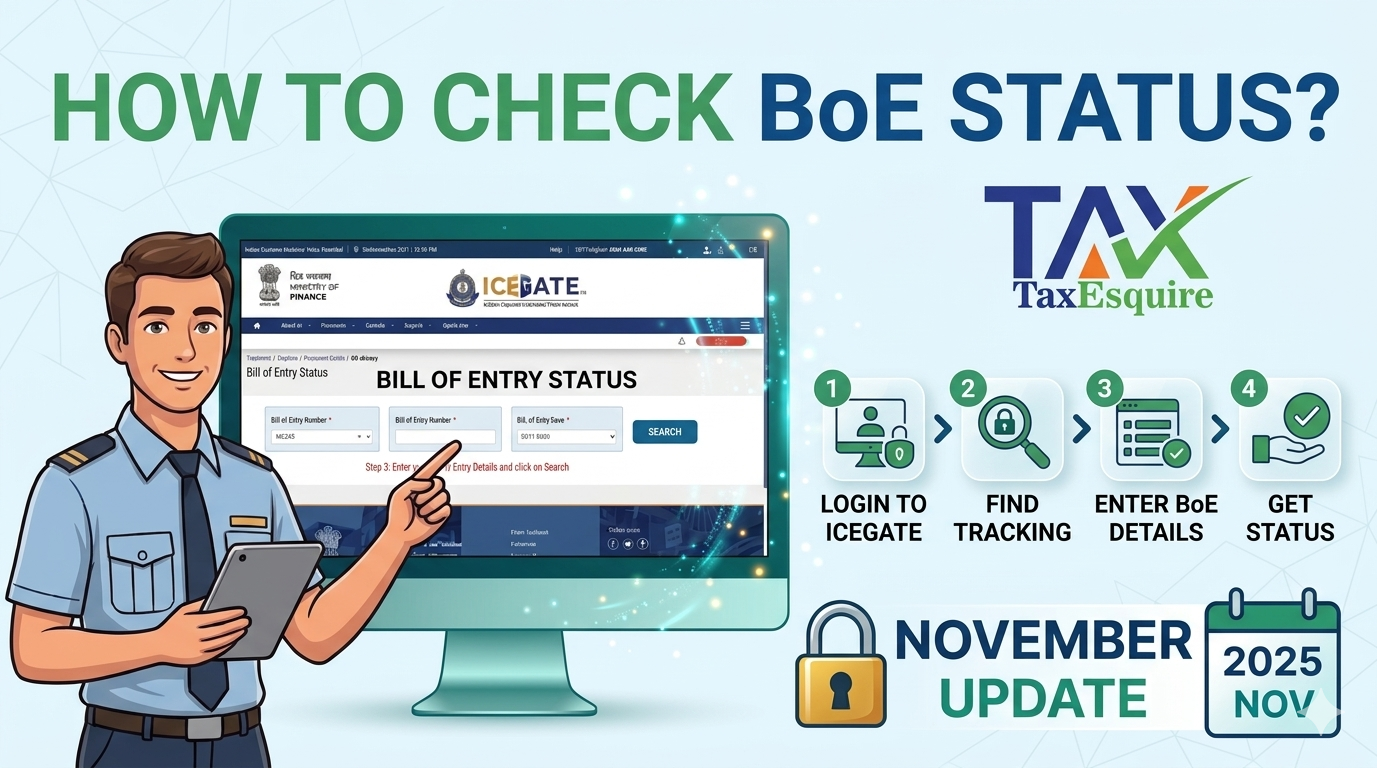
Importers can check the status of their Bill of Entry through the ICEGATE portal using the following steps:
Step 1: Log in to the ICEGATE Portal through your ID and password.
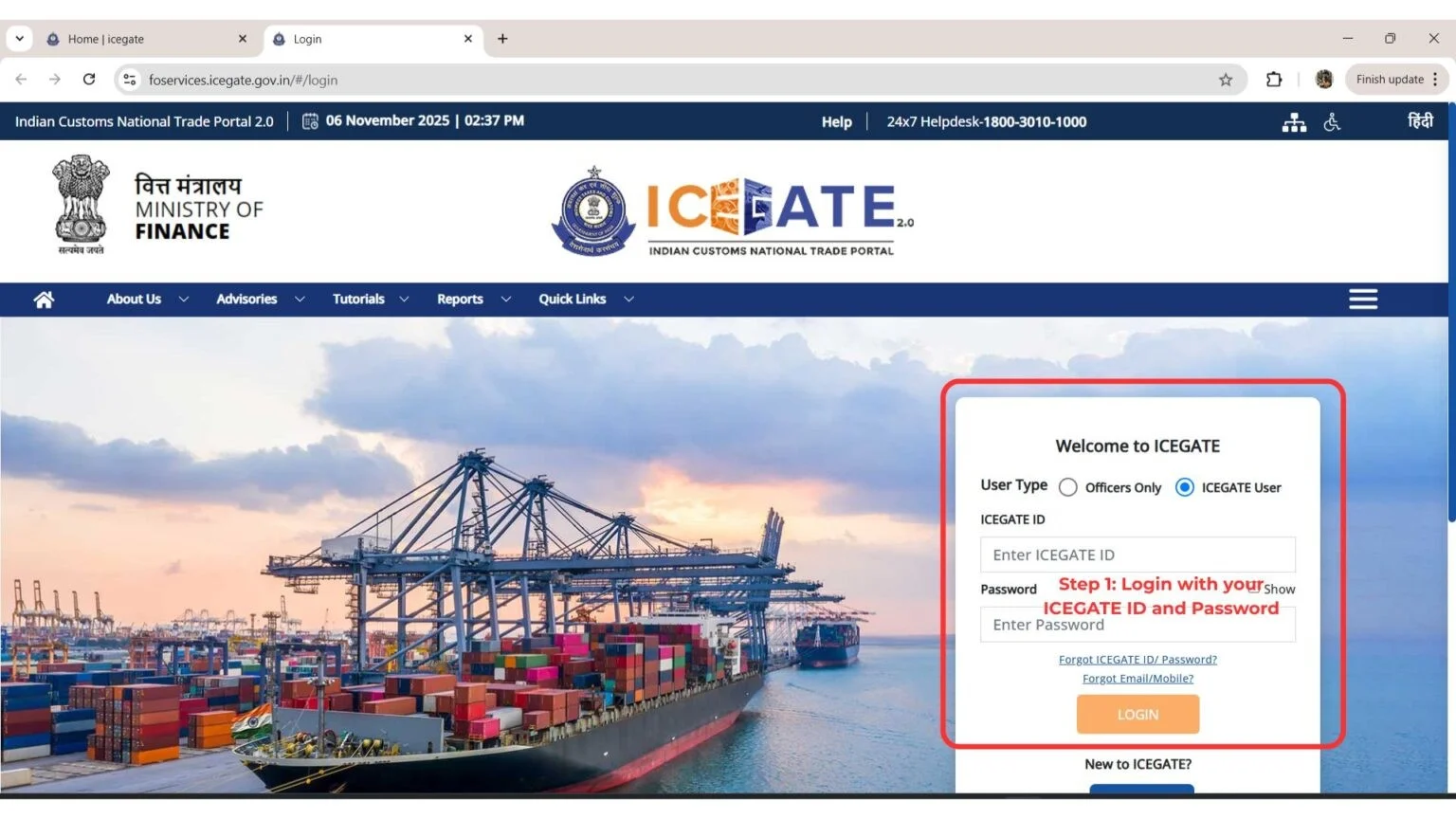
Step 2: CLICK ON THE LINK SHOWN BELOW ONLY AFTER LOGGING IN. If you do not log in first, clicking on the link will redirect you to the login page.
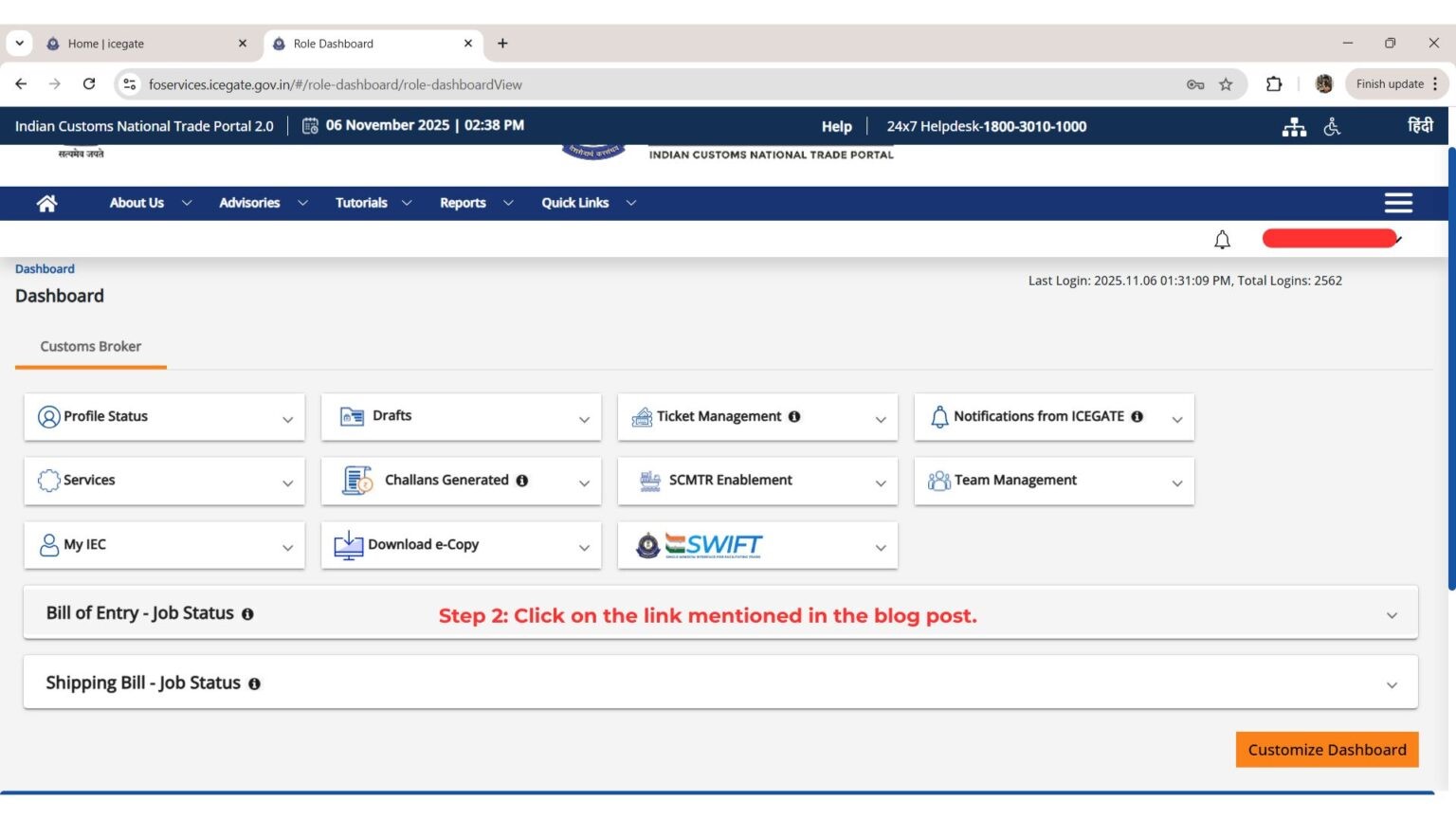
Step 3: Click on the link https://foservices.icegate.gov.in/#/enquiries/document-status/ds-bill-of-entry ONLY AFTER LOGGING IN.
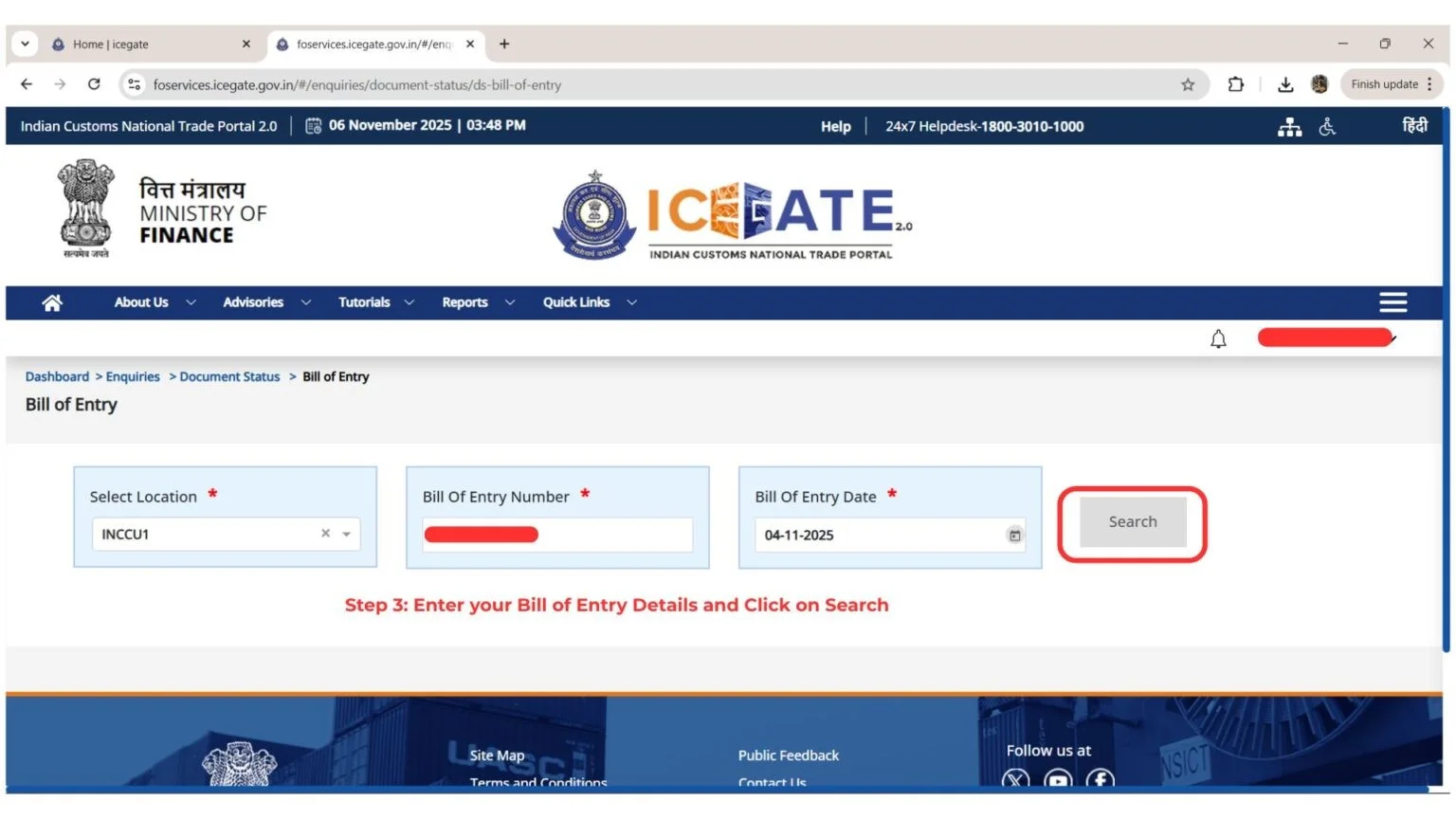
The link will open, and you will need to enter your Bill of Entry details then click Search.
That’s all! You will be able to view your Bill of Entry BOE Status.
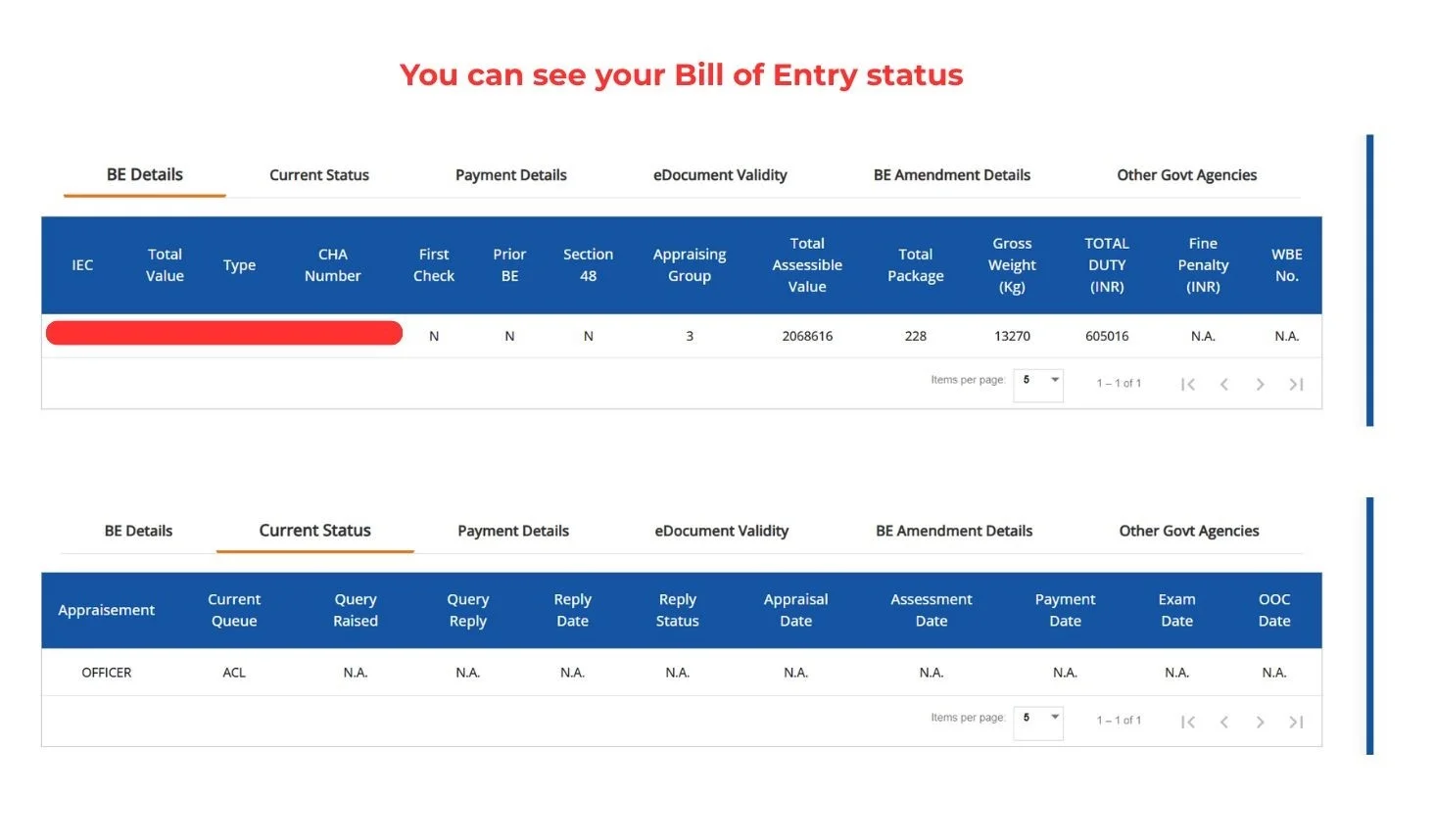
Here’s how to check bill of entry BOE on ICEGATE
Types of Bill of Entry Status
The Bill of Entry may reflect different stages during processing:
• Open: Initial stage; document under processing
• Ready: Available for further action or printing
• Assessed: Verified by customs authorities
• Closed: Goods cleared and process completed
Understanding these statuses helps importers track clearance progress effectively.
Key Details Included in a Bill of Entry
|
S. No. |
Particulars |
Description / Practical Meaning |
|
1 |
Importer & Exporter Details |
Identification details of the importer (IEC holder) and foreign supplier/exporter involved in the transaction. |
|
2 |
Import Export Code (IEC) |
A 10-digit code issued by DGFT, mandatory for all import/export transactions and customs clearance. |
|
3 |
Port Code |
A unique code representing the customs port where goods are imported. It helps identify jurisdiction and processing location. |
|
4 |
Bill of Entry (BoE) Number |
A unique reference number generated by customs for tracking and processing the import declaration. |
|
5 |
Bill of Entry Date |
The date on which the Bill of Entry is filed and registered with customs authorities. |
|
6 |
Invoice Number |
Commercial invoice reference issued by the exporter, used for valuation and verification of imported goods. |
|
7 |
Invoice Date |
The date mentioned on the commercial invoice, important for determining transaction timeline and valuation. |
|
8 |
Description & Value of Goods |
Detailed description, quantity, classification (HSN), and declared value of goods for duty calculation. |
|
9 |
Port of Entry & Destination |
Specifies where goods arrive in India and the intended final delivery location. |
|
10 |
Applicable Duties & Tax Structure |
Breakdown of customs duty, IGST, cess, and other applicable charges based on classification of goods. |
|
11 |
License & Compliance Information |
Details of any import licenses, regulatory approvals, or restrictions applicable to the goods. |
Practical Significance for Businesses
From a compliance and operational standpoint, tracking the Bill of Entry status is not merely procedural—it directly impacts:
• Working capital (through ITC claims)
• Inventory planning and logistics
• Compliance with GST and customs regulations
• Coordination with customs brokers and logistics partners
Delays or errors in status can result in financial and operational inefficiencies.
Conclusion
The ICEGATE Bill of Entry status is a vital compliance and operational tool for importers in India. Regular monitoring ensures transparency in customs procedures, facilitates timely tax credit claims, and minimizes the risk of delays or penalties.
Businesses engaged in import activities should adopt a proactive approach by tracking their Bill of Entry status regularly and ensuring that all required details are accurate and up to date.
Author: CA POONAM GUPTA & ADV LOKESH GUPTA
© 2026 Tax Esquire | Expert CA Services in Greater Noida, Uttar Pradesh
8810380146 | info.taxesquire@gmail.com | taxesquire.in
This document is for informational purposes only. For personalised tax advice, consult our chartered accountants.